Maker online editor
Casting Mold Generator
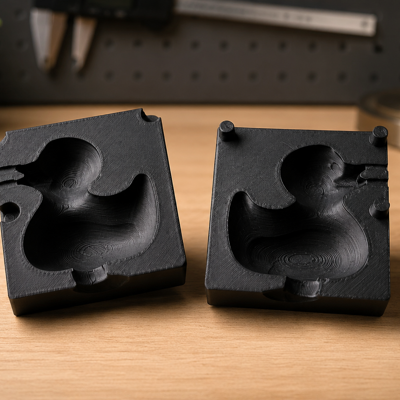
Upload a watertight master model and generate an open or two-part mold. Configure parting, clearance, keys, sprue, and vents, then inspect and export the mold parts.

InputSTL · OBJ · 3MF
ExportSTL · OBJ · 3MF
Access5.00 RUB / 24 hours
Best suited for
- Cold-casting molds
- Two-part molds for complex masters
- Reusable mold-design workflows
Editor capabilities
- Open and split mold modes
- Configurable clearance and shell
- Registration keys, sprue, and vents
- Cutaway preview and part export
From input to a finished model
-
01
Enter the source data
Upload a supported file or configure the initial parameters.
-
02
Adjust the model
Tune dimensions and editor-specific settings while checking the 3D preview.
-
03
Validate the result
Check dimensions, printability, material, and output settings.
-
04
Export
Download a supported format and complete preparation in your slicer when needed.
Things to consider
- The source mesh must be closed and suitable for the selected parting plane.
- Re-entrant geometry may prevent demolding.
- Always review casting-material safety requirements.
How source data is processed
Mold generation uses the uploaded master in the editor. Project saving and selected processing functions may send data to Maker services.
Need help with the settings?
The guide covers editor settings and preparing the result for export.
Description updated: 2026-10-17