Maker online editor
Voxelizer
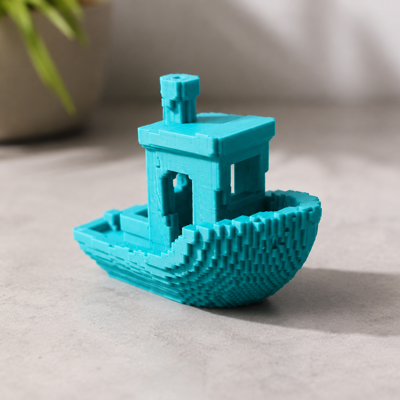
Upload a 3D model and convert it into a voxel-style object. Tune resolution and scale, inspect the result, and export it for printing.

InputSTL · OBJ · 3MF
ExportSTL · OBJ · 3MF
AccessFree
Best suited for
- Voxel-art styling
- Simplified game and decorative objects
- Exploring detail versus recognizability
Editor capabilities
- Import a source 3D model
- Adjust voxel resolution
- Preview the result in 3D
- Export the converted geometry
From input to a finished model
-
01
Enter the source data
Upload a supported file or configure the initial parameters.
-
02
Adjust the model
Tune dimensions and editor-specific settings while checking the 3D preview.
-
03
Validate the result
Check dimensions, printability, material, and output settings.
-
04
Export
Download a supported format and complete preparation in your slicer when needed.
Things to consider
- Small details may disappear at low resolution.
- High resolution increases processing time and mesh complexity.
- Check minimum feature size before printing.
How source data is processed
The source model is used for conversion and is not published. Saving or server features may send data to Maker services.
Need help with the settings?
The guide covers editor settings and preparing the result for export.
Description updated: 2026-10-17